RS-232 remains relevant
In the late 1990s, IT professionals faced a limited set of options when it came to configuring network devices. One of the primary methods for setting up routers and firewalls was through the trusty RS-232 interface. While this is quite dated it remains a reliable and relevant means of communication.
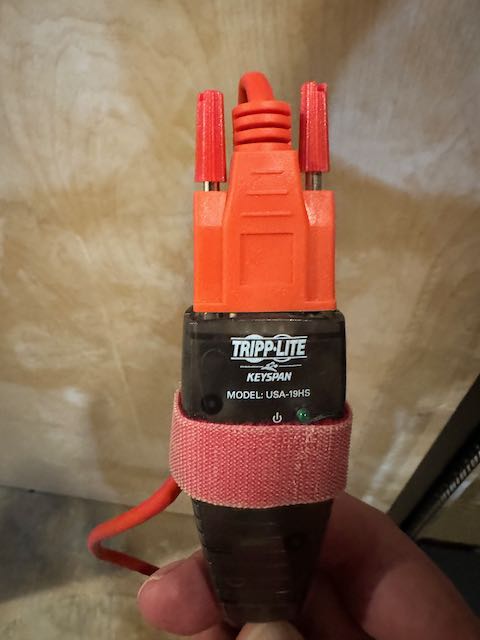
Fast forward to today's cloud-centric world, where sleek web interfaces dominate the landscape of network management. You might think that RS-232 has become obsolete, relegated to the annals of tech history. However, this couldn't be further from the truth. I recently dusted off an old Keyspan device and cable that was in my "techy GO-BAG" and used that as the foundation to construct a DIY RS-232 console server using a Raspberry Pi.
Why RS-232 Still Matters
- Fundamental Knowledge: Understanding RS-232 helps grasp the basics of how devices communicate at a low level. Baud rates, stop bit, oh my!
- Failsafe Access: When network connectivity fails, a direct serial connection can be your lifeline to diagnose and fix issues.
- Security: Serial connections are inherently more secure as they require physical access to the device, reducing the attack surface.
- Learning CLI Syntax: Many modern network devices still support CLI (Command Line Interface) configuration. Using an RS-232 connection forces you to interact with these CLIs directly, enhancing your understanding of command syntax.
Building Your Own RS-232 Console Server
Creating a DIY RS-232 console server with a Raspberry Pi is an excellent project that combines hardware tinkering with software configuration. Here's why it's worth your time:
- Cost-Effective: Commercial console servers can be expensive. A Raspberry Pi-based solution is significantly more affordable, and many of you probably have an older RPi3 sitting on the shelf.
- Customizable: You can tailor the setup to your specific needs and preferences.
- Educational: The process teaches you about Linux, networking, and hardware interfacing.
- Practical: Once set up, you have a powerful tool for managing multiple network devices.
Getting Started
To build your RS-232 console server, you'll need:
- A Raspberry Pi (any recent model will do) RPi4
- USB to RS-232 adapters (one for each device you want to manage) - I already had a few Keyspan adapters handy and just needed to get the serial to RJ45 cable
- Ethernet cable for network connectivity
- Power supply for the Raspberry Pi
- MicroSD card for the Raspberry Pi's operating system
There are thousands of tutorials on how to get the RPi setup, so I won't cover those steps here. There are several different methods to communicate with the serial port, here are a few options with my preferred method.
- cu - This is a package that can be installed that originates from the name "Call Up" another system back when we used to use modems.
- minicom - another common package that supports some file transfer options like Kermit.
- [CURRENT FAVORITE] tio - You can find the source on github, a beautifully simple and effective Terminal IO. Congrats to the author for fine work.
If you don't want to build tio from source you can always install the package with
Then it is as simple as this to start using tio
Closing thought
While modern network management tools have their place, there's still immense value in understanding and utilizing RS-232 connections. While it is a small project but building your own console server you have another tool at your disposal, and it may just save you when you misconfigure a router and lock yourself out.
Dust off that old Raspberry Pi. The world of RS-232 is waiting to remind you why it's still relevant in today's networking landscape.